Setup
Review Your Plan and Billing Status
Understand your church plan, setup deadline, subscription state and billing recovery options.
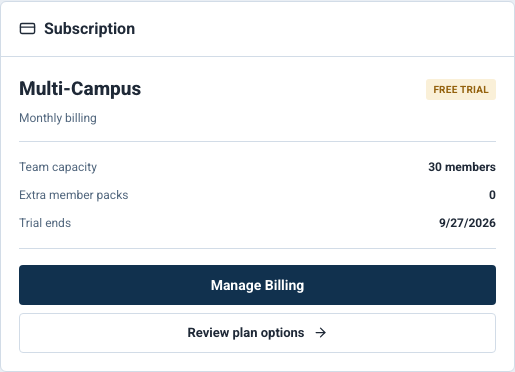
Use Church Admin > Billing to review your church subscription. Billing is managed on the web by authorized church administrators or leaders with billing access. Your subscription belongs to the church, not to each team member.
Review the current state
- Open Church Admin and the Billing area.
- Review the current plan, billing interval, access status and displayed deadline.
- Compare campus and member usage with your plan limits.
- Select Review Plans when you need the current options, then review the price and terms shown in Checkout before confirming anything.
The current billing screen is the source for your church's price, capacity and status. A feature can also depend on church configuration, permissions or separately enabled access; a plan name alone does not guarantee that every control is available.

Example shown with fictional demo data. View full-size screenshot.
Setup window and trial
For new churches enrolled in guided setup, the billing setup window begins when the founding administrator activates the church. The subscription trial is separate and starts through Checkout. Confirm its duration and deadline on the screens shown for your church. Resending an invitation, adding another administrator or returning to setup does not restart the activation deadline.
Older churches retain their assigned billing history and deadlines. Follow the dates shown for your own church rather than assuming that a new sign-in or invitation starts another trial.
Complete Checkout and return to setup
- Select the plan and monthly or annual interval on the billing screen.
- Review and complete the Stripe Checkout flow.
- Return to Vigilant and confirm that the billing card reflects the expected state.
- If you came from guided setup, use Return to saved church setup to continue your drafts.
A successful return can happen before Stripe's status update reaches Vigilant. Refresh the confirmed billing status before retrying a blocked campus activation or invitation. Do not purchase a second subscription just because the page has not refreshed yet.
Manage an existing subscription
Select Manage Billing to open the Stripe customer portal. Use the controls offered there for payment methods, invoices and supported subscription changes. Read the effective date before confirming a plan change or cancellation, then check the resulting state in Vigilant.
Canceling a subscription, suspending a member, disabling church access and requesting account deletion are different actions. An access override does not cancel Stripe charges. For a deletion request, use the dedicated account or church deletion process.
Resolve blocked access or capacity
- Billing setup required or trial expired: open Billing and complete the recovery action shown for the church.
- Payment issue: review the payment method and subscription in the portal, then refresh Vigilant.
- Campus/member limit: review current usage and the plan before retrying. Saved setup drafts are not active campuses or memberships; real pending invitations may count toward member capacity.
- Checkout completed but status is unchanged: allow the update to arrive, refresh, and contact support if the issue persists.
Include the church name, displayed status, approximate Checkout time and exact error in your support request. Never include card details or payment credentials.