Account & Access
Request Account or Church Deletion
Choose the correct deletion request and understand how it differs from membership removal and billing cancellation.
Use the dedicated account deletion request when you want to request permanent deletion. Removing a person from a church team and canceling a subscription are separate actions.
Choose the request scope
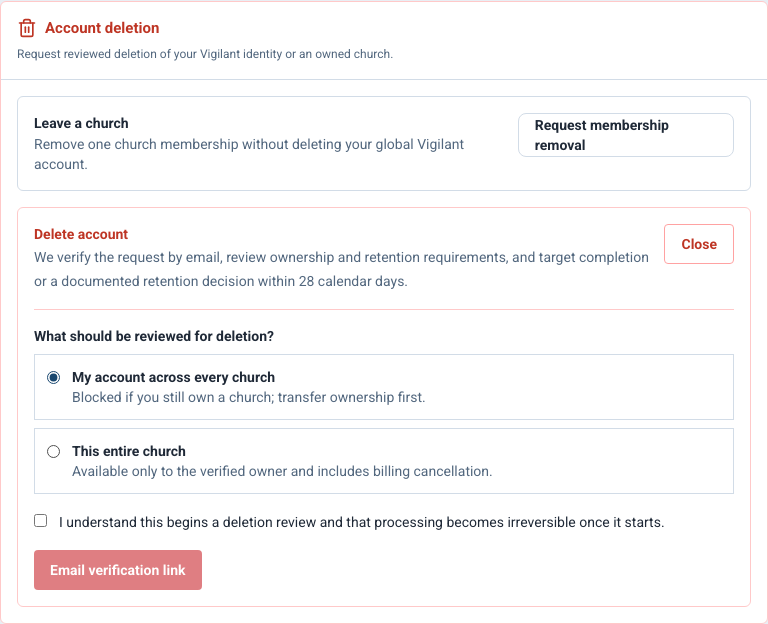
- Your personal account: concerns your Vigilant identity and its memberships. Review the form carefully if you belong to more than one church.
- An entire church: concerns the church workspace and its data. Only an authorized church owner should request this; a support review must confirm authority and scope.
For access removal, first review How to Remove a Team Member. Delete Member suspends the membership in the selected church and retains the saved profile; it does not delete the shared account or other church memberships. If you only need to change or cancel paid service, use Billing.

Example shown with fictional demo data. View full-size screenshot.
Submit and verify
- Open the deletion request form and choose the intended request type.
- Enter the account email and the details requested for that scope.
- Submit the form, then open the verification email sent to that address.
- Follow the verification link before it expires. Use a new request or the recovery option if the link is no longer valid.
- Follow the request's confirmation and status instructions. Contact Support using the request reference if you need to correct the scope.
Submitting a form is not confirmation that permanent deletion has completed. Verification, authorization review and processing can be required. Use the current form, confirmation and Privacy Policy for the applicable process; do not assume that a billing cancellation or team suspension erases data.
Before an authorized church deletion proceeds, arrange any required ownership handoff and records handling with church leadership. Do not send sensitive records or account credentials in the request description.
Ownership and request cancellation
Personal deletion is blocked while you are a church's sole owner. Transfer ownership through the authorized process first or request whole-church deletion. Whole-church processing includes cancellation of Vigilant billing. To cancel a deletion request before processing begins, follow the current deletion page's instructions or contact privacy@vigilantchurch.com.